

Let Us Simplify It in a Plain Manner
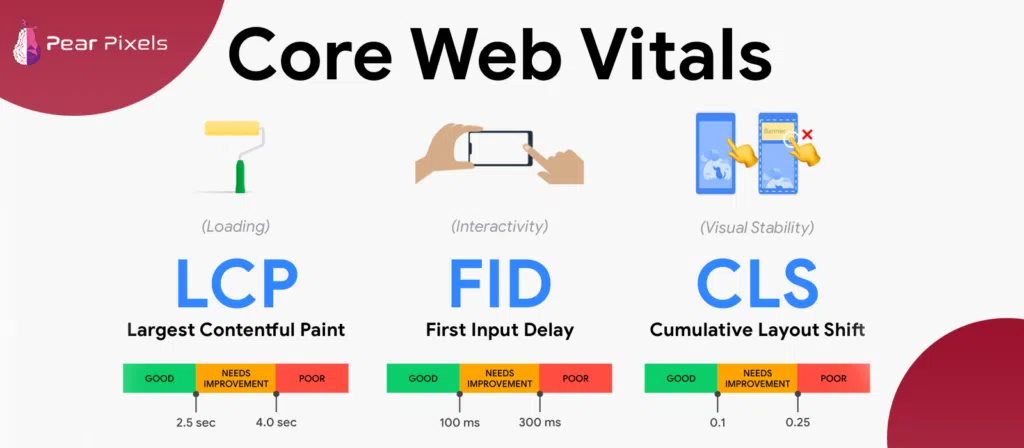
Core Web Vitals has three major components. All of them look at the other side of your website experience. Consider it as speed, stability, and response. The largest contentful paint is the first one, which is also referred to as LCP. This one is the duration that the largest visible object on your page takes to load. It may be a picture, a video or even a huge block of text. When it becomes too slow, people think that your site is slow, although other elements may have already loaded.
Next is Cumulative Layout Shift, or CLS. This is the extent to which your page is moving around as it loads. You may have experienced it previously: you attempt to press a button, and then it moves to a different place. That is poor CLS, and a very irritating experience.
The third one is Interaction to Next Paint or INP. This one tests the speed with which your site responds to an action by a person. Similar to clicking a button, clicking a menu, or typing. In case of latency, users experience latency, and that is not a good thing at all. Then, when you enquire once more, what are Core Web Vitals? They are fundamentally these three indicators collaborating with one another to gauge how comfortable and responsive your web page is.
Why Then Need You Know Anything About It?
At this point, here is the thing: Core Web Vitals are not only some technical numbers that developers can play with. They do affect actual users, and actual users determine whether they will remain or not.
A fast and stable website feels comfortable. Individuals spend more time, browse more pages, and have higher chances of conversion. On the other hand, if your site is slow or jumpy, they leave without even thinking twice. That is what we refer to as a high bounce rate, and this is detrimental to your overall performance.
The metrics are also employed in the ranking system of Google. What is better Core Web Vitals can improve your site ranking? It is not the sole element, but it is a powerful one, particularly in times when competition is stiff. It is not only about speed but also about better visibility, better engagement, and more confidence for the users.
What are the Best Figures You Want to Achieve
A little discussion of thresholds, but not much. In the case of Largest Contentful Paint, 2.5 seconds or below is a good score. That is to say that your core content must be visible almost immediately. When it exceeds this, the users begin to experience delay, and anything beyond 4 seconds is regarded as poor.
In the case of Cumulative Layout Shift, the score must be 0.1 and below. That is, you do not have to worry about your layout shifting out of place. When it exceeds 0.25, you will find your page frustrating to use.
In the case of Interaction to Next Paint, a good value should not exceed 200 milliseconds. Between 200 and 500 is a way of improving, and beyond 500 is the point where the user is obviously lagging. Such figures might seem insignificant, yet these are really enormous in actual experience.
How Can You Check Your Site in Reality
You will not need to guess about your performance; there are tools that will reveal it all. A frequent method is through the utilization of site audit tools. You merely get into your domain and scan. It displays your Core Web Vitals status, slow pages, and what requires improvement. It resembles a sort of health report on your site.
The other approach is through the Chrome User Experience data, which provides the real user experience on your site. This is significant, as it is founded on real-life usage and not laboratory tests. Google PageSpeed Insights is also very popular. You put your URL in, and it breaks everything down with performance score, diagnostics, and recommendations. It also displays mobile and desktop data, which is quite helpful.
Then there is Google Search Console. It categorizes your pages as good, poor, and needing improvement. It assists you in viewing patterns rather than simple pages, hence correcting problems becomes simpler.
Without Analyzing Core Web Vitals Too Much
However, now it may seem like a complex task to improve these metrics, but it is not necessarily so difficult. In the case of LCP, you can begin with the optimization of images. Big pictures take a long time to load; compression can be of great assistance. It also helps to use modern formats such as WebP. The loading speed can also be increased by better hosting and caching.
In the case of CLS, the trick is to establish image and video sizes. Without dimensions, the browser does not know how much space to allow, and thus, things start shifting. Mend this, and your layout is fixed.
In the case of INP, the most important point is to lessen heavy JavaScript. Excessive script causes your site to be slow to perform. It is better to subdivide long tasks to make the browser more responsive. Even the removal of unnecessary features can make performance better. It is not always necessary to do everything, but sometimes just little things can make a huge difference.
A Little Yet Significant Plan
Trying to do everything simultaneously is one of the mistakes that many people commit. That usually creates confusion and delays. It is more appropriate to give priority. Begin with the least performing pages. Then correct problems that are least difficult, such as image optimization. Then proceed to more complicated improvements.
Also, consider your type of website. When it comes to a blog, loading speed is more important. In case it is an e-commerce store, stability and interaction become more of a concern.
The Fixes are Not As Important As Strategy.
sealing off the end of it in an actual sense. It is likely that by this point you have a pretty good understanding of what are core Web vitals and why they are more important than ever. These are not mere technical measures; they are an expression of user sentiment when they come to your site.
Trust is developed through a fast, stable, and smooth site. It keeps the users busy and contributes to the natural growth of your rankings. These metrics are not worth being ignored because they will gradually bring your site to the bottom, regardless of your good content.
Instead of looking at them as complex numbers, look at them as feedback from your users. The fact that, in the end, that is what they are is just an indicator that you are either on the right website or not.